Deployment of
Java Beans (Jelly Beans)
used to interface
web screens using ActiveLINC to
Host LINC systems (part 1)
Table of Contents:
How are these Java Bean generated?
How do I find out what the CLASSPATH value is or change the
CLASSPATH value?
In what folders are the Java Beans
deployed?
How do I find the Java environment values defined in
Component Enabler?
An illustration of location of Java
Beans
Discussion on Folder Naming Conventions
How are Java Beans related to a browser accessing a Host
LINC application?
Brief flow of data from a
browser to the host application and back to the browser.
How are
these Java Bean generated?
There currently are two means
to produce Java Beans. PCE and EAD
(LDA) 3.1 release.
Where do the
JAVA Beans go?
The generated JAVA Beans are
typically located on the web server, or a PC on the same LAN segment, which is visible to the web server.
The folder in which they are found is user-controlled but it is
critical to synchronize with the environmental variable “ CLASSPATH” and the
EAD31 Component Enabler values. The
first step is to determine the value of the CLASSPATH.
How do I find out what the
CLASSPATH value is or change the CLASSPATH value?
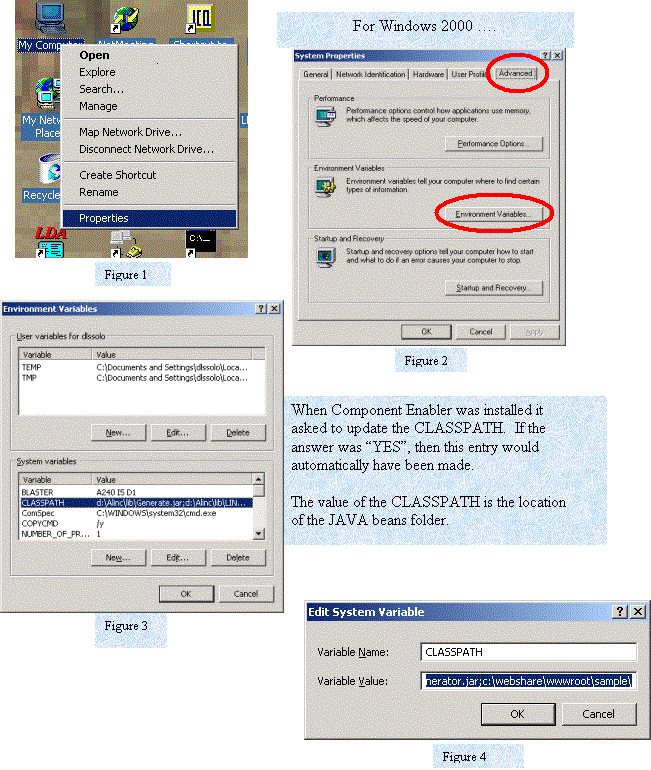
In this illustration the
CLASSPATH value is:
C:\webshare\wwwroot\sample\
In what
folder are the Java Beans deployed?
Actually determining the
CLASSPATH is the first step. The
deployed Java Bean path is the combination of the CLASSPATH along with the Java
environmental values. These environmental
attributes can be found in EAD/LDA 3.1 Component Enabler settings.
How do I find the Java environment values defined in Component Enabler?
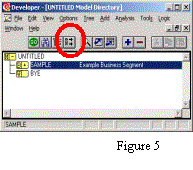
Within the EAD3.1 Developer,
open the
System Directory window.
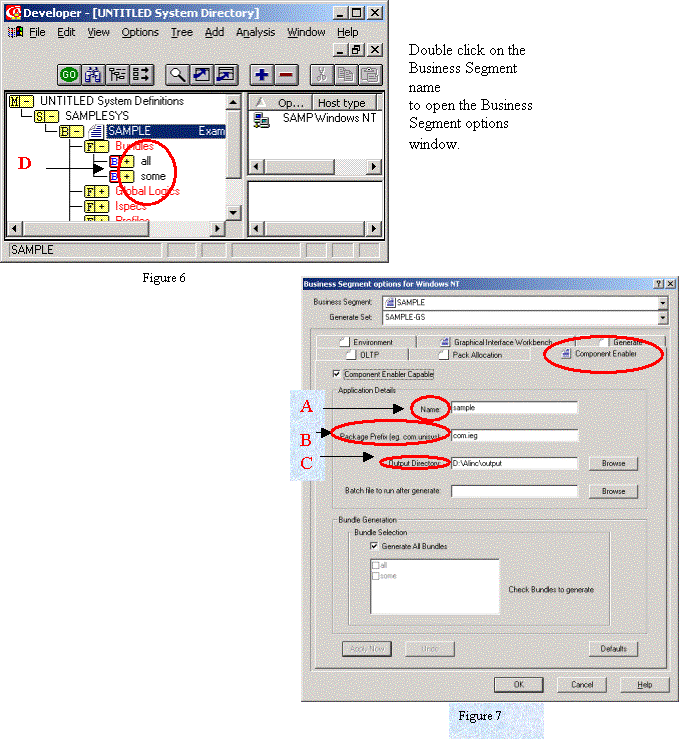
Now with this information,
the location
where the Java Beans will be generated by
EAD/LDA will be:
{C} + {B} + {A}
+ {D} + “ispecs”
The actual location where the
Java Beans
will be deployed is:
CLASSPATH + {B} + {A}+ {D}+ “ispecs”
As illustrated in this example the Java Beans will be found at …..
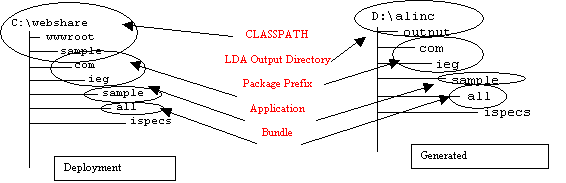 and
and
Since the bundle name is
involved in the naming string, other locations may contain Java Beans for this
Business Segment.
Discussion on Folder Naming Conventions
The naming strings, at first
glance, look to be confusing and over engineered. This is not necessarily the case.
The CLASSPATH in our
illustration happens to be relative to the IIS directory
(c:\webshare\wwwroot\sample). (note:
typically IIS uses a path name of “..\inetpub\…”). We should note that the CLASSPATH really has
no relationship to IIS or the web server other than visibility. This value
could have been “c:\Beans”, “d:\jellybeans”, or “c:\webstuff”. It could also have been the same name used
in EAD as the output directory
“d:\alinc\output”. IEG uses EAD
to test the ActiveLINC RATL environment.
Using the EAD output directory, when the Java Beans are generated by
EAD3.1, then new Java Bean versions are immediately deployed. This might be practical to generate new
Beans into the CLASSPATH value in a test environment; however, in larger
installation environments, generating Java Beans directly into the CLASSPATH
value would not be advisable. This
might be due to accessibility between the EAD server and the WEB server plus it
would not be recommended to generate directly into a “production”
environment. This means, the CLASSPATH
specifies the location of where IIS expects to find Java Beans; therefore, would
be a production environment.
The Package Prefix represents a Company
ID or an organization. It would be
critical to differentiate one organization from another for sites hosting
applications for multiple companies. A
convention suggested is “com” or “org” followed by a “.” (dot) followed by the
{organization or company name}. This is
only a convention and not a requirement.
If the “.” (dot) is included, this creates two folders “com/ieg”.
The Application Name is just that, it is a name for
the application being hosted. This helps organize information relative to one
application versus another application also being hosted within the same
network.
The Bundle Name is perhaps the most confusing. It is user-defined and therefore can be
anything you want. Names such as “all”,
“every” or “some” have been used in many examples but perhaps this is where the
confusion begins.
When left to making up a
bundle name of your own, the mind starts drawing a blank. IEG would suggest applying the same concept
that LDA has with Functional areas and Activities. As a ”best practice”, IEG suggests to first define, in LDA, a
functional area and call it something like “Stuff-on-the-Web”,
“Web-Interfaces”. Then begin to define
Activities under this Functional area that represent various interface types. This might be related to functions within
the application or perhaps to represent various users types. Think about “Who will use this interface
on the web?” or “Are all users equal?” or “What parts of this
application are to be “exposed” to the general public?” These answers will
help define Activity names.
Each activity
should contain the collection of all painted GLGs and ISPECs that relate to
this activity. Once this is started, bundle names are not
as hard to come up with. Bundle names
become ADMIN users, POWERUSERS, or RESTRICTED users. Perhaps the bundle names are TAXINQ for inquiry into Tax
Assessment because these Inquiry ISPECs are the only ISPECs that are to be made
available to the general “public”, or REGIS for online registration of members
or users.
Other examples of the path
strings of where Java Beans might be found:
generated deployed d:\alinc\output\com\ieg\sample\admin\ispecs\….. c:\webshare\wwwroot\sample\com\ieg\sample\admin\ispecs\….. d:\alinc\output\com\ieg\sample\poweru\ispecs\….. c:\webshare\wwwroot\sample\com\ieg\sample\ poweru \ispecs\….. d:\alinc\output\com\ieg \sample\restrict\ispecs\….. c:\webshare\wwwroot\sample\com\ieg\sample\ restrict \ispecs\….. d:\alinc\output\com\ieg \sample\regis\ispecs\….. c:\webshare\wwwroot\sample\com\ieg\sample\ regis\ispecs\….. d:\alinc\output\com\ieg\sample\taxinq\ispecs\….. c:\webshare\wwwroot\sample\com\ieg\sample\ taxinq\ispecs\….. EADOutputDirectory PackagePrefix ApplicationName BundleName(EAD Activity) CLASSPATH
How
are Java Beans related to a browser accessing a Host LINC application?
A browser user
will access the host LINC application by going to some web home page, which
contains a “link” to this host application.
Upon clicking this link, communication is made to the hosting web server
requesting that an ASP page be rendered.
This first request initiates a “session” between this PC and the
application. To initiate a “session”
there is a routine named GLOBAL.ASA, which is invoked by IIS. GLOBAL.ASA has the responsibility of
initializing the communication between the end-user browser and the ActiveLINC
RATL front-end in to the LINC application.
In GLOBAL.ASA
various environment variables are defined to control the connection flow. These variables include: PackagePrefix,
ApplicationName, and BundleName
Gee do these
sound familiar. By this time they
should. These are the same values we
have been discussing. As part of the
IEG process a GLOBAL.ASA is automatically generated setting values for
PackagePrefix, ApplicationName, and BundleName. GLOBAL.ASA sets these variables and ActiveLINC now knows where
to find the Java Beans by using the same formula above: CLASSPATH +
PackagePrefix + ApplicationName + BundleName + “ispecs/”… .
GLOBAL.ASA works
in conjunction with another ASP routine that processes data to and from the
browser and RATL. This routine may have
any name, but IEG has named this routine DATATORATL.ASP. In short, the locations of ASP pages are
known to DATATORATL.ASP and GLOBAL.ASA.
Brief flow of data from a browser to the host application and
back to the browser.
When the end-user
submits a transaction from the browser:
·
The browser
submits the ASP form with data to DATATORATL,
·
The Java
Beans are located to gain knowledge of the RATL buffer layout,
·
Data is
submitted through the RATL interface into host LINC,
·
LINC processes
the data, data is returned via the RATL buffer back to DATATORATL,
·
DATATORATL
initiates the ASP form,
·
The
execution of the ASP form, merges the data from the RATL buffer with the form
(which might be the same form that was initiated or another form, was a RECALL
done in logic), and
·
The results
are rendered into the user PC as a browser web page.
Information of
how ASP pages are associated with the application is covered in more detail in
the ASP pages section of this
overview.