Deployment of ASP pages
using Unisys Component Enabler (ActiveLINC)
to interface with
Host EAE (LINC) systems (part 2)
Table of Contents:
How
are these ASP Pages generated?
Discussion on
Folder Naming Conventions
How do you initiate an application from an
html link (URL)?
How are these ASP Pages
generated?
There are several means to
produce Active Server pages (ASPs).
Manually write them or generate them using IEG’s Interface Builder (IB)
product or other ASP generator products in the market.
Where do the ASP pages go?
The only real requirement of
where ASP pages are located is that they be visible to Internet Information
Server (IIS) and that the folder name be given permission to allow script
execution. What is placed in this
folder is another question. The answer
will cover various ASP environment routines and how they interact with each
ISPEC’s <ispec>.ASP form. The following information applies to
environmental and ASP routines generated by IEG’s Interface Builder
product. (Other
implementations might have different information contained in the respective
ASA/ASP/JS/INC/HTML libraries.)
Note: Underlined text
indicates the path where the respective environmental files would be deployed.
·
GLOBAL.ASA: This routine
is the initial routine that IIS will call the first time a browser requests to
be connected to an application. This
request is normally the result of the user clicking on a hyperlink on a web
page that directs the user to the application.
This file is deployed “directly” in
the IIS application folder.
·
DATAtoRATL.ASP: Once the
initial connection between the browser user and the application is made then transactions
flow in and out of DATAtoRATL.ASP. This
routine communicates with Component Enabler (ActiveLINC) to identify, which
ISPEC is being processed, and what data is being submitted. Upon a REFRESH or RECALL, the respective
ISPEC is made known to DATAtoRATL.ASP to execute the appropriate ASP form. The deploy path
is relative to the folder containing the ASP forms.
·
<ispec>.ASP: An ISPEC’s ASP is actually executed by IIS by
executing server scripts which pull in data from Component Enabler (ActiveLINC)
and also data in the form of List Boxes.
This data is merged into the ASP form based on data field names as
written in the ASP form. The ASP form
can be written in a way that it uses other routines as functions or
subroutines. These routines are found
in the <>.INC, <>.JS, and CSS.htm files. These files are deployed in the
folder designated to contain the ASP forms.
·
<>.JS: Acts as a library of Java scripted functions that
manipulate list box data and open additional browser windows. This library is downloaded once to the
browser user’s PC and then runs from the ‘client side’. The path is relative
to the folder containing the ASP forms.
·
<>.INC: Acts as a library of functions that retrieve data
from Component Enabler (ActiveLINC)/RATL in order to be merged together with
the ASP form and rendered to the browser user’s PC. This routine will execute on the ‘server side’. This deploy path
is relative to wwwroot.
·
IEGCSS.htm Style Sheets:
IEGs implementation uses Cascading Style Sheets that apply to groups of
ASP forms. Instead of defining the
colors, fonts and styles in the actual form, IEG uses this IEGCSS.HTM file to
assign Class names to various combinations of these attributes. Changes made to CLASS records in the
IEGCSS.HTM file are immediately applied to all forms that reference the
specific CLASS that was modified. This
file is downloaded once to the browser user’s PC and then is applied to forms
referencing the file and the CLASS records with in it. The deploy path is relative to the folder containing the ASP
forms.
·
Abandon.ASP: This routine is called when the
application requests a Recall BYE to terminate the browser session. The
file is deployed next to DATATORATL.ASP
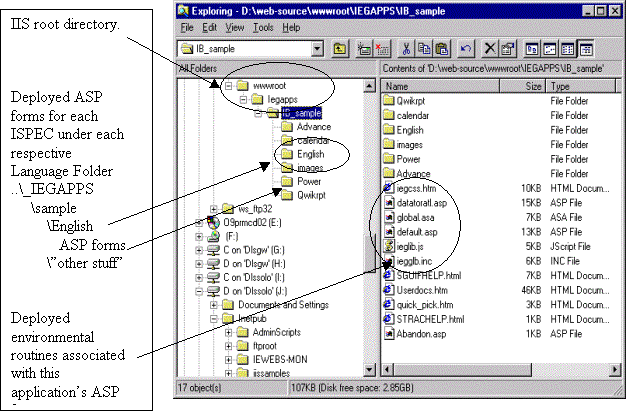 Illustration:
Discussion on Folder Naming
Conventions
The naming convention for
folders under IIS is user-determined. IEG
would recommend that you apply a similar naming convention to these folders as
was applied to the location of the Java Beans.
(PackagePrefix=Company ID {IEGAPPS} )
(ApplicationName= Host EAE / LINC Application {sample} )
(BundleName=logical grouping
of forms, activity related, language grouping.
{English} )
Unless you would be hosting
multiple companies, the PackagePrefix node would be optional. Applications clearly need to be
separated. How ASP forms are grouped
gets back to the activities with which they are associated. An advantage of grouping forms by activity
is that unless the ASP form is accessible in the folder it cannot be
rendered. This provides one additional
level of security. If an attempt made
to request a form not associated with this grouping, the user will get “page
not found”. This approach makes it
pretty easy to deny access to forms the user should not be using even if they
know (or might guess) the name of the form.
(Other
implementations might deploy ASP pages and environmental routines in different
Folders.)
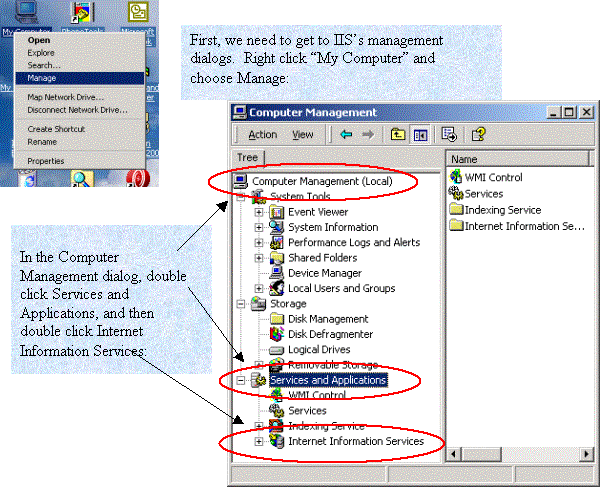
What is an IIS
Application?
To ease (or complicate?)
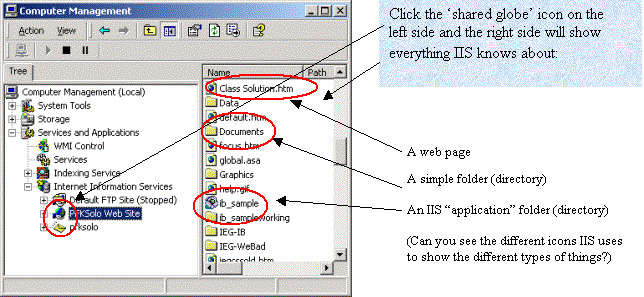
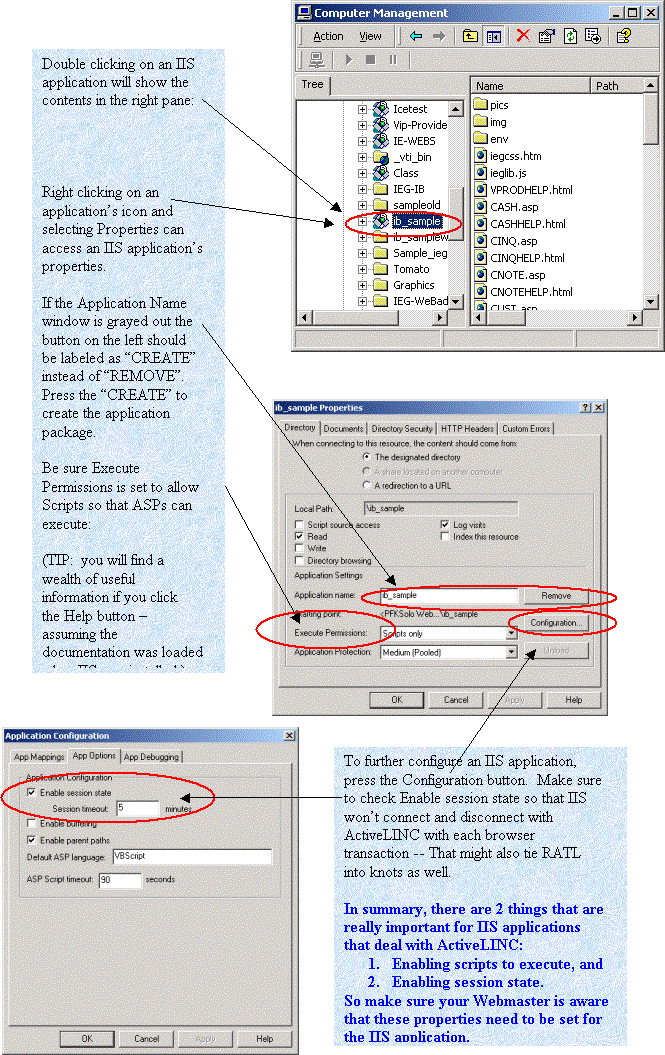
administration for the “webmaster”, IIS has a concept of “application.” Try not to confuse an IIS application with an
EAE application, although they are closely related. An IIS application is a folder (directory) containing files and
having special properties appropriate to a web server. IIS applications are declared and maintained
in IIS dialogs. The pictures below are
from Windows 2000 Pro, so expect some differences depending on your operating
system and level of IIS. Nonetheless,
you can get the general idea.
How do you initiate the application from an html
link (URL)?
Accessing the application
should be from a web page that contains an HTML link. The LINK would point to the hosting application server by a www
address or an IP number plus the name of a folder that relates to the business
segment (EAE application) being deployed plus the name of a folder that relates
to one of the language folders. As an
illustration, the following links could all be used to navigate from a web page
to the IB_SAMPLE application. These
links are not case sensitive.
<ip>/IB_SAMPLE/English/SMENU.ASP where SMENU is the fire-up Ispec.
<ip>/ib_sample/English/RMENU.ASP where RMENU is an alternate fire-up Ispec.
<ip>/IB_SAMPLE/POWER/SMENU.ASP where SMENU is the fire-up Ispec for POWER
users.
<ip>/IB_SAMPLE/Spanish/smenu.asp where SMENU is the fire-up Ispec for Spanish
users.
IB_SAMPLE is the folder name
under wwwroot that is associated with the business segment name. For clarification the actual business segment
name is recommended but is not required.
ENGLISH, POWER, SPANISH are
all examples of EAE languages. ENGLISH
is primary language and POWER and SPANISH represent other language versions of
the same Ispecs.
SMENU and RMENU are two
Ispecs defined in the EAE application.
Interface
Builder ( IB - GUI ASP HTML generator ) IM, XREF are products of IEG, Inc.
EAE LINC EAD LDA
ActiveLINC Component Enabler CE are references to products of Unisys
Corporation.